Bottleneck audit · Priority implementation in 3-7 business days

WordPress Speed Optimization

Is your WordPress website slow, unstable, or underperforming on mobile? We audit the real bottlenecks and implement the highest-impact improvements without automatically requiring a full redesign.
WordPress speed bottleneck audit and optimization

Optimization That Starts with the Real Bottleneck

We do not simply add another optimization plugin. We first identify the slowest and most consequential part of the website, then implement improvements in stages so the result stays safer and easier to measure.

Audit themes, plugins, assets, cache, database, and server response

Prioritize actions by impact instead of trial and error

Improve the metrics that matter for UX and Core Web Vitals

Recommend a structural or infrastructure change only when it is justified

View the Main Benefits

Real Speed Optimization Results

Examples of performance work completed on business WordPress websites.
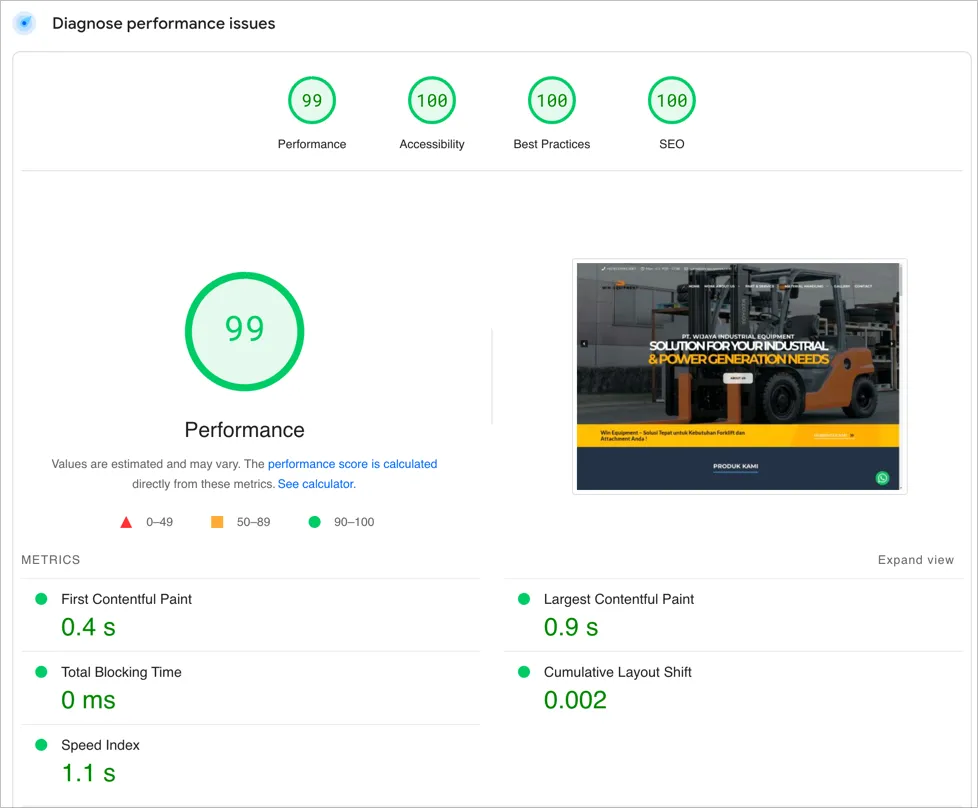
WIN Equipment PageSpeed score after optimization

WIN Equipment Speed Transformation

Mobile PageSpeed improved from 27 to 92 after structured optimization across the website, plugins, and server environment.
27 → 92
Mobile score
36 → 99
Desktop score
43 → 19
Plugin count
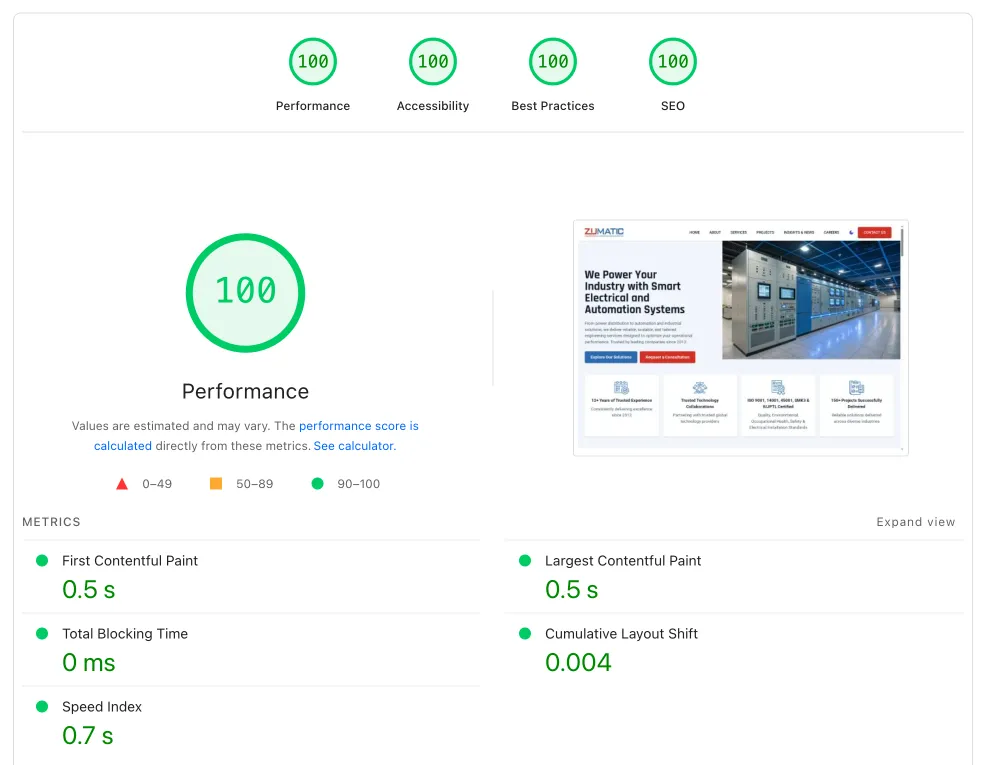
PT Zumatic website performance after optimization

PT Zumatic Core Web Vitals Optimization

Mobile performance improved by 75.47% and loading time fell by almost 49% through a structured technical approach.

+75.47%
Mobile performance
-48.95%
Loading time
122 → 64
HTTP requests

What We Handle in WordPress Speed Optimization

Full Performance Audit

We map the dominant causes of slow loading so time is spent on the changes that matter most.

  • Core Web Vitals and waterfall audit
  • Plugin and theme analysis
  • Render-blocking review
  • Quick-win and structural priorities

Asset and Media Optimization

Visual assets and static files are made lighter for mobile and desktop delivery.

  • Efficient image compression and formats
  • Measured lazy loading
  • Non-critical CSS and JS optimization
  • Removal of unnecessary resources

Caching and Database Tuning

Caching and database behavior are adjusted to make response times more consistent.

  • Page and object cache configuration
  • Query and database-table review
  • Autoload and transient cleanup
  • Cache rules for dynamic pages

Plugin and Script Optimization

We reduce avoidable browser and server load from plugins and scripts.

  • Overlapping or conflicting plugin detection
  • Unused module cleanup
  • Context-aware delay or defer
  • Light custom-script refactoring

TTFB and Server Response Improvements

If the bottleneck is the infrastructure, we identify the right server-side improvement or recommendation.

  • Hosting and server bottleneck analysis
  • PHP and web-server review
  • VPS upgrade recommendation when needed
  • Direction to VPS Setup for full execution

Before-and-After Validation

Each implementation is evaluated so the outcome is visible rather than based on assumptions.

  • Before-and-after metric comparison
  • Implemented-change notes
  • Stability checklist
  • Monitoring and next-step recommendations

A Shorter Path from Audit to Improvement

We implement the highest-impact steps first so performance can improve without unnecessarily disrupting the live website.

1

Intake and Scope

We gather the website context, performance target, and pages that matter most to the business.

We gather the website context, performance target, and pages that matter most to the business.

This keeps the optimization tied to business needs rather than chasing a tool score in isolation.

Page priorities
Business context
2

Bottleneck Audit

We identify the root causes of slow loading across the front end, back end, and server.

We identify the root causes of slow loading across the front end, back end, and server.

The audit can cover Core Web Vitals, network waterfall, plugin and theme overhead, cache, database, and TTFB.

CWV and waterfall
Database and cache
3

Quick-Win Implementation

We implement the safer high-impact improvements first so the initial result can be seen sooner.

We implement the safer high-impact improvements first so the initial result can be seen sooner.

Examples include asset optimization, cache tuning, unnecessary-plugin cleanup, and blocking-script improvements.

Asset optimization
Plugin cleanup
4

Deeper Optimization

When needed, we continue at the structural or server level after the initial improvements are understood.

When needed, we continue at the structural or server level after the initial improvements are understood.

We explain whether the next useful move is a redesign, a server change, or an ongoing maintenance workflow.

Structure
Server strategy
5

Validation and Handover

We share the after-audit summary, implemented changes, and a basic monitoring plan.

We share the after-audit summary, implemented changes, and a basic monitoring plan.

You receive a concise record of what changed and the most sensible next priority for keeping performance stable.

Summary report
Monitoring plan

WordPress Speed Optimization FAQ

Common questions before starting a WordPress performance project.

How long does WordPress speed optimization take?

For a standard scope, priority implementation usually takes 3-7 business days. Websites with many custom pages or complex integrations may need a different timeline after the initial audit.

Do I need a full website redesign to improve speed?

Not necessarily. Many websites can become faster without a full redesign. We start by finding the technical bottlenecks that have the greatest impact on real user experience.

Can you guarantee a PageSpeed score of 100?

We do not promise an absolute score because every website and testing condition is different. We focus on relevant UX metrics, Core Web Vitals, and stable performance under real traffic.

How is this different from a website redesign?

Speed optimization focuses on improving an existing website technically. A redesign changes the interface and often the structure as well. See Website Redesign when the wider experience also needs to change.

When should I upgrade hosting or move to a VPS?

If the audit finds server-side limits, high TTFB, or insufficient resources, infrastructure may be the real bottleneck. We can help through VPS Setup or Managed WordPress Hosting.

Will the website stay online during optimization?

Yes, in most cases. We minimize risk on the live website and use staging first for changes that need more careful validation.

Is support available after optimization?

For longer-term performance care, see Website Maintenance for updates, monitoring, and ongoing technical support.

Not sure whether the problem is speed, hosting, or the wider website experience? Chat with us and we will help identify the right starting point.

Ready to Find Out What Is Actually Slowing Your Website Down?

Share the symptoms, the important pages, and the performance changes you want to see. We will help map the technical causes and the most useful next action.