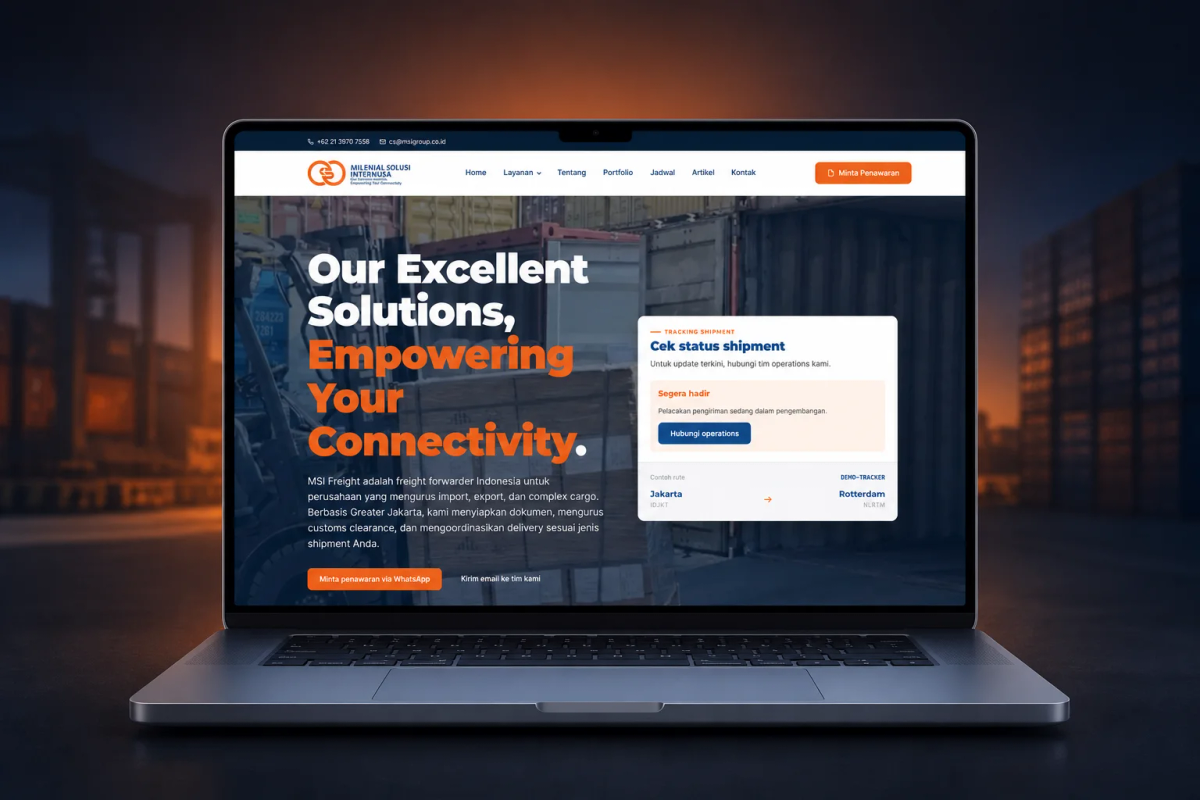
Design source
MSI’s HTML site
On March 9, 2026, Mas Bagus from PT Milenial Solusi Internusa, or MSI Freight, contacted me to discuss their company profile website at exportimportdept.com.
The initial request was not simply to create a new look. MSI wanted a website that would be more ready for marketing and SEO.
The website also needed to be easier for the internal team to manage without depending on a developer for small to medium changes.
My initial plan was to rebuild the website with GeneratePress and GenerateBlocks.
However, during an online meeting, the MSI team showed me the HTML site they had designed and developed themselves.
At that point, the project direction changed. I did not need to create a new visual concept from scratch. Instead, I transformed the HTML design into WordPress with a custom theme and custom blocks.
The result was 13 pages based on the HTML site while preserving its design.
Behind those pages was a WordPress content system, the migration of 32 articles, and 346 301 redirect rules to maintain continuity for the old URLs.
Design source
MSI’s HTML site
Page scope
13 HTML-based pages
Architecture
Custom theme + custom blocks
Content migration
32 articles + 346 redirects
MSI already had a website with service information, a portfolio, articles, photos, videos, and a contact page.
The problem was that the website was not yet ready to serve as a long-term foundation for marketing and SEO.
Some of the available references were also frontend backups. I was not starting with a complete source code and database that could simply be transferred.
Because of that, the rebuild had to start by reading the existing structure and visual design.
From our initial discussions, MSI’s need was clear: visitors needed to understand their freight forwarding services more easily.
The internal team also needed to update content without asking a developer for help every time something changed.
The old website tracking also did not clearly distinguish web leads from other activities, such as local actions in Google Maps.
So the new website needed to make interactions such as WhatsApp, phone calls, and forms easier to measure.
GeneratePress and GenerateBlocks were still reasonable choices for a company profile website that needed a lightweight and flexible foundation.
That is why they were my initial plan.
However, the HTML site the MSI team showed me already contained the visual direction they wanted.
The homepage had a hero section with a container photo, a large headline, blue and orange brand colors, a shipment tracking panel, and office information near the bottom.
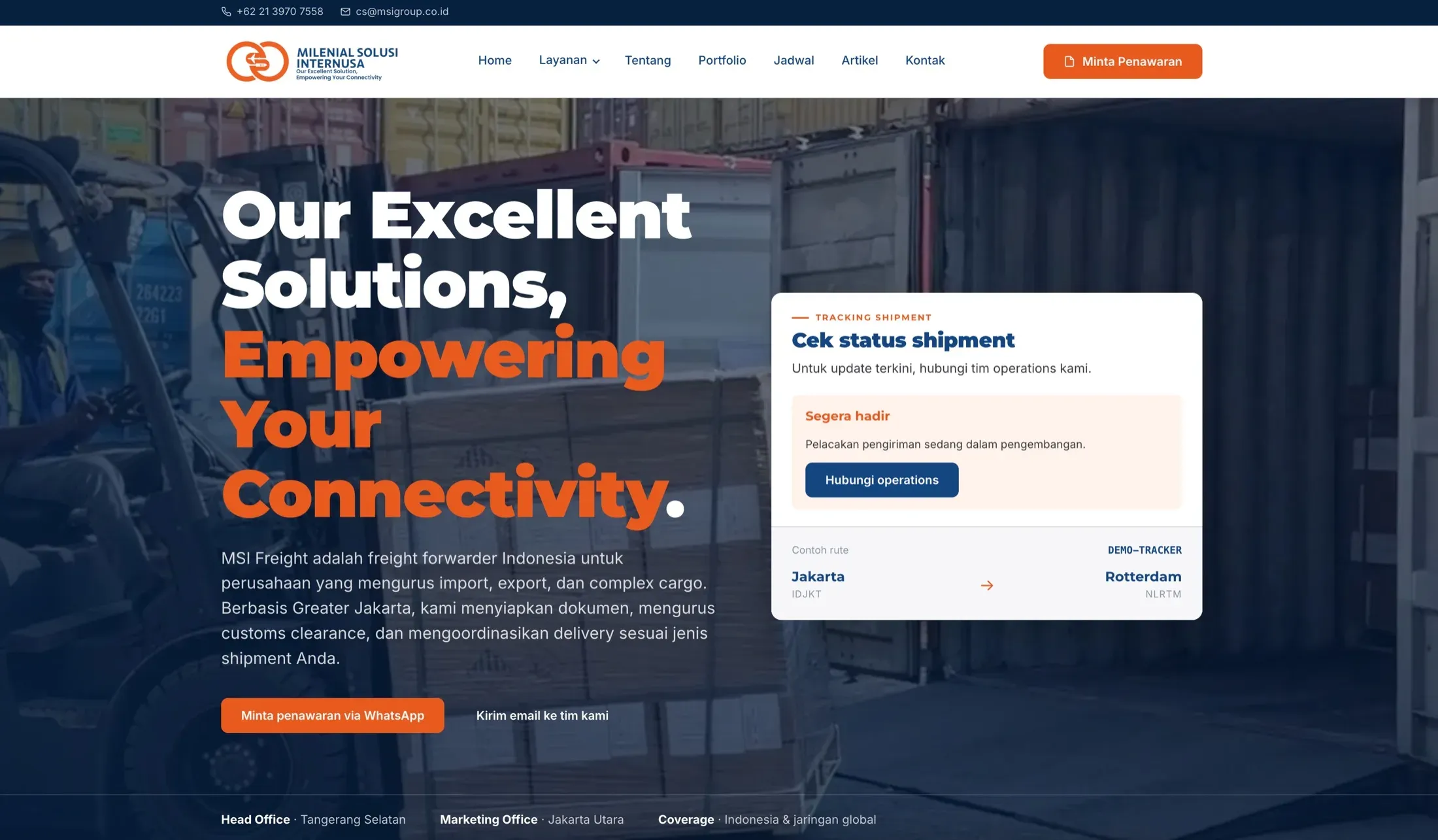
If I had continued with a template-based approach and redesigned everything from the beginning, there was a risk that the final result would move away from the design MSI had already approved.
There would also be extra work to reinterpret the layout, spacing, components, and visual hierarchy.
That is why I recommended a custom theme adapted to the HTML site.
The decision was not because GeneratePress or GenerateBlocks were bad. It was because the project requirements were already more specific than simply choosing a ready-made theme.
For the final scope, I built 13 pages based on the HTML site structure provided by the MSI team.
That number referred to the main pages that were part of the website, not simply the number of records that would later appear in the WordPress database.
Beyond those pages, the website also needed several content types so that content management would not fall back to raw HTML.
I prepared structures for services, portfolio items, articles, and export-import schedules based on MSI’s operational needs.
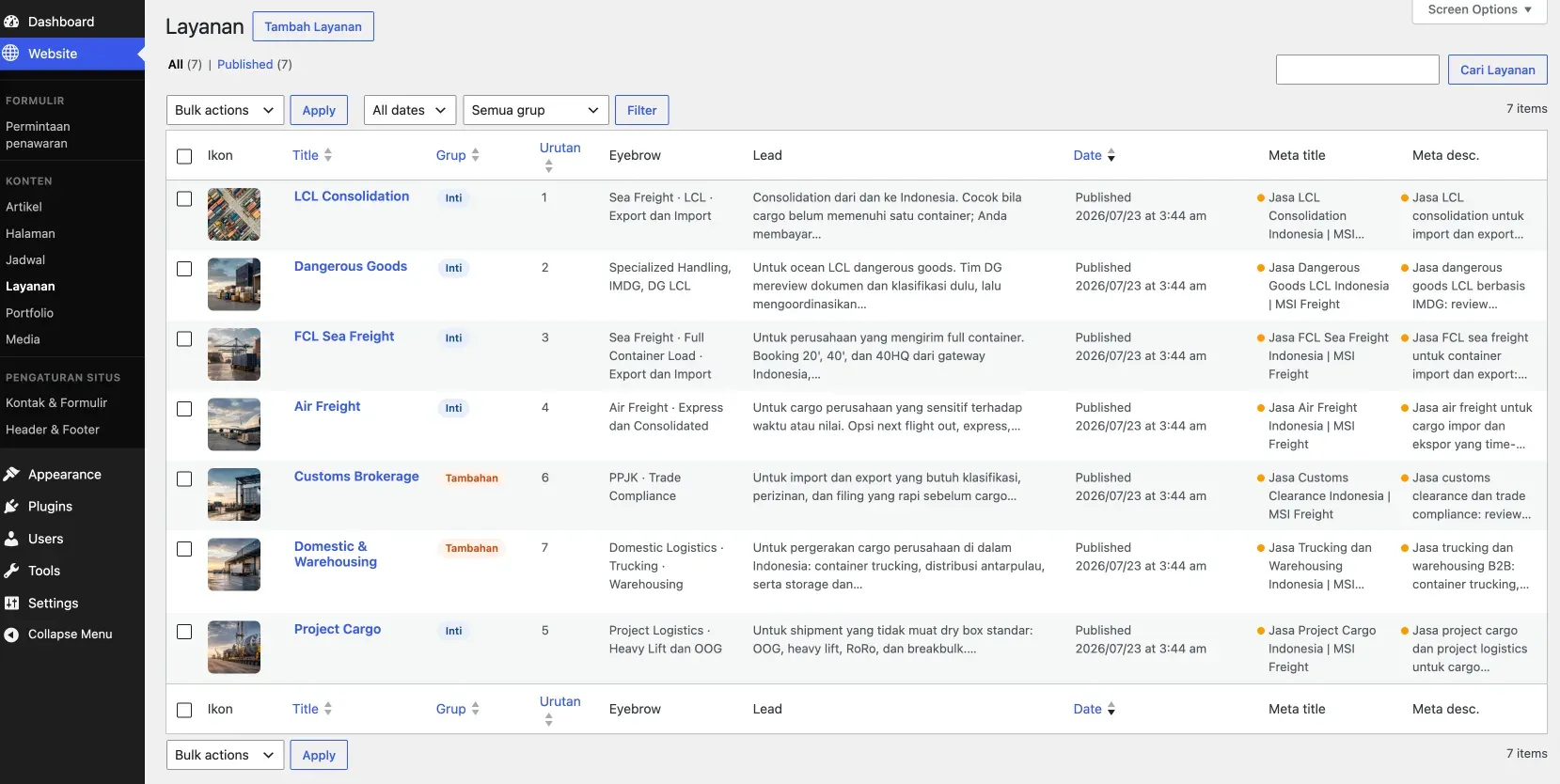
The service list has fields and metadata that can be managed from the dashboard instead of raw HTML.
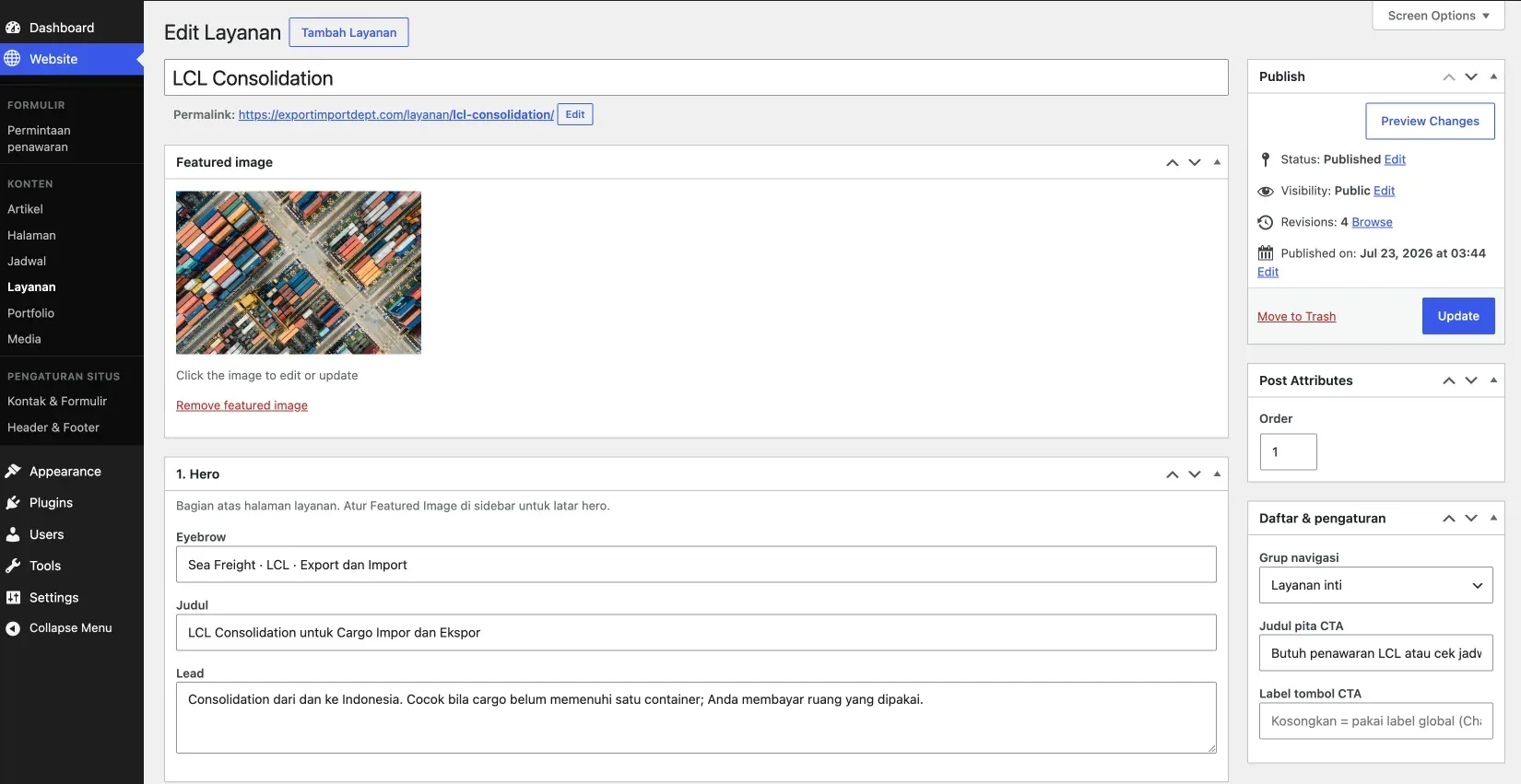
The LCL service editor separates the hero, lead, SEO metadata, and navigation settings from the frontend template.
This decision mattered because static pages and recurring content have different management needs.
The main pages needed to preserve their layout, while articles, services, portfolio items, and schedules needed to be added or updated regularly.
The portfolio also had its own editor for featured images, galleries, categories, and project information.
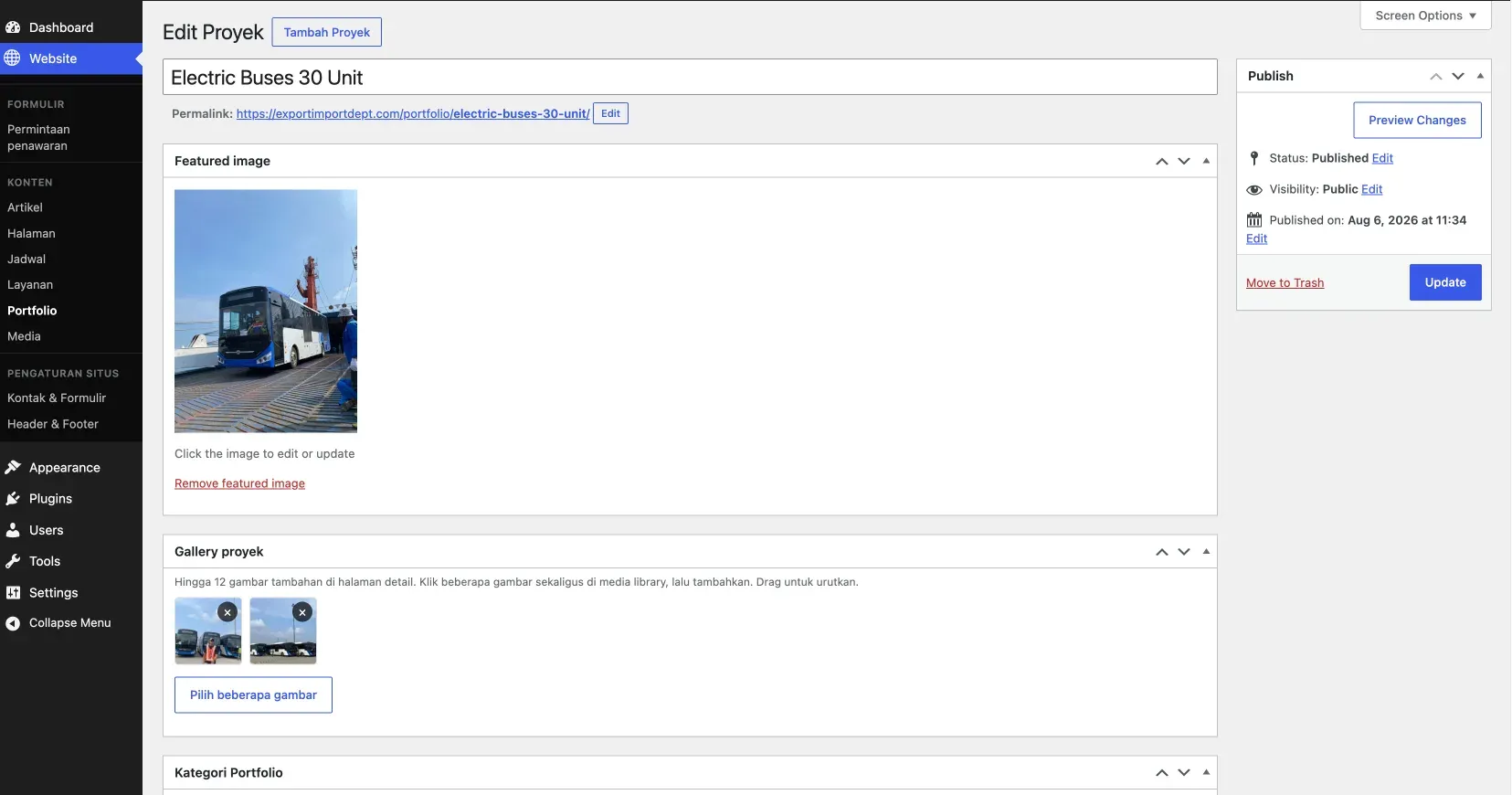
Portfolio fields allow the team to add a new project without rebuilding the layout from scratch.
I used the custom theme to control the visual foundation, templates, header, footer, and styles that needed to stay consistent.
The content area was then made editable through custom blocks prepared around the homepage design.
In the demo I gave the MSI team, the homepage started with an empty content area, together with the header, footer, and call to action before the footer.
The team could then add sections using the available blocks, change text, URLs, photos, or videos, and rearrange them with drag and drop.
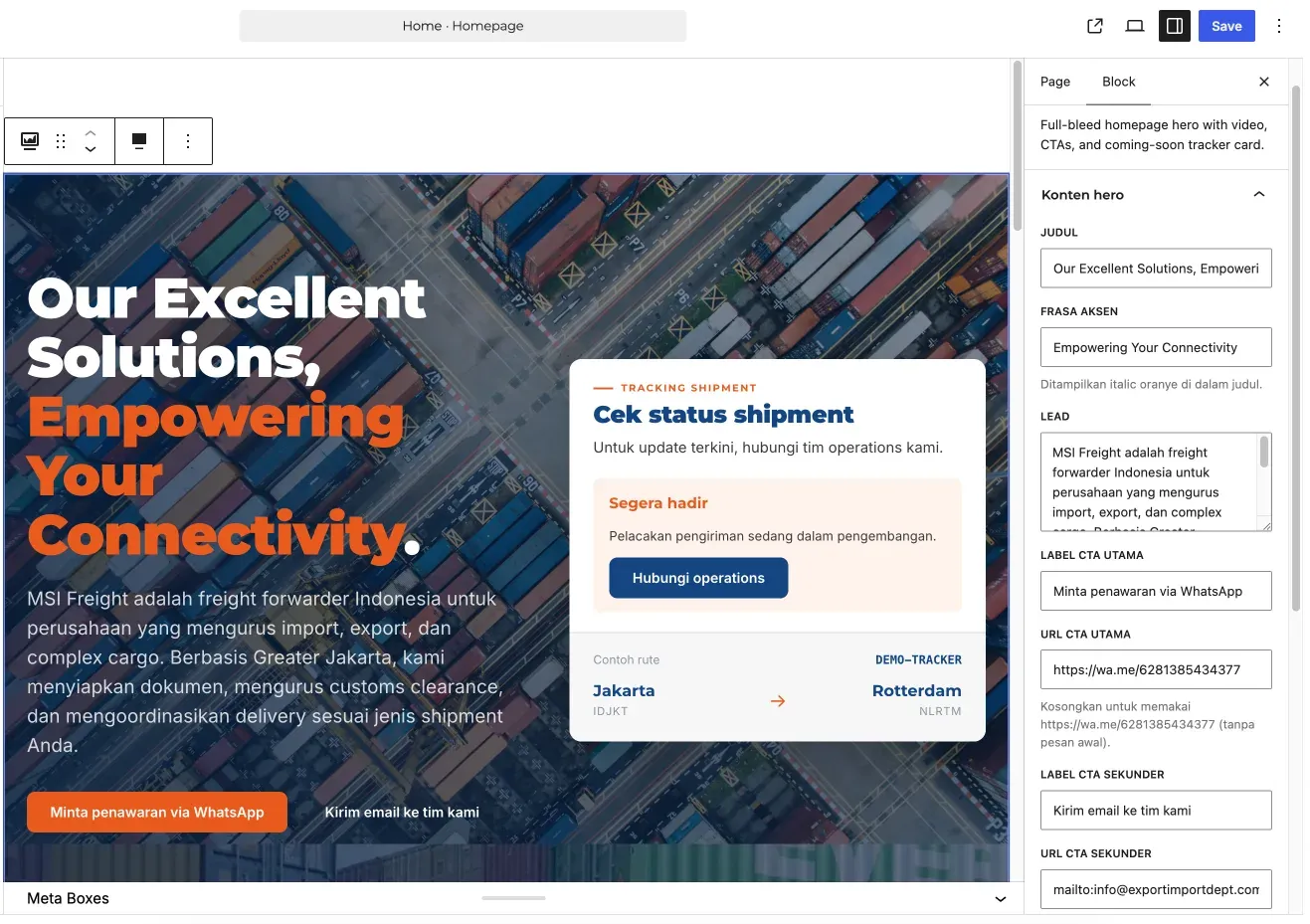
The homepage can be edited in the block editor while the hero, CTA, and tracking panel continue to follow the agreed design.
This is an important difference between preserving a design and preserving the way HTML works. The design remained the visual reference, but content management moved into a more practical WordPress workflow.
Where possible, I also kept website functionality separate from the theme.
Custom blocks, custom post types, website settings, quote forms, and special features were placed in a functional layer so they would not all be attached to template files.
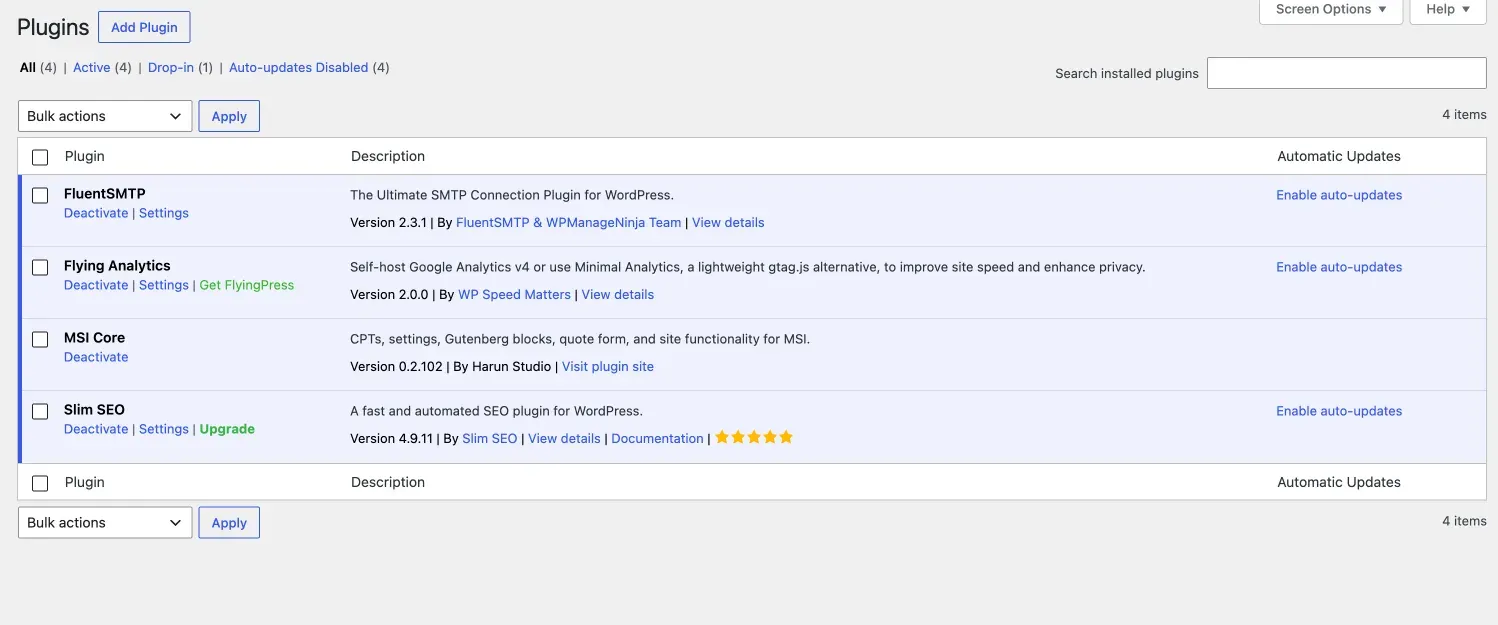
The MSI Core functional layer handles CPTs, settings, Gutenberg blocks, quote forms, and website-specific requirements.
Global settings, such as the header and footer, were also created in a dedicated area so they would not need to be edited directly in theme files.
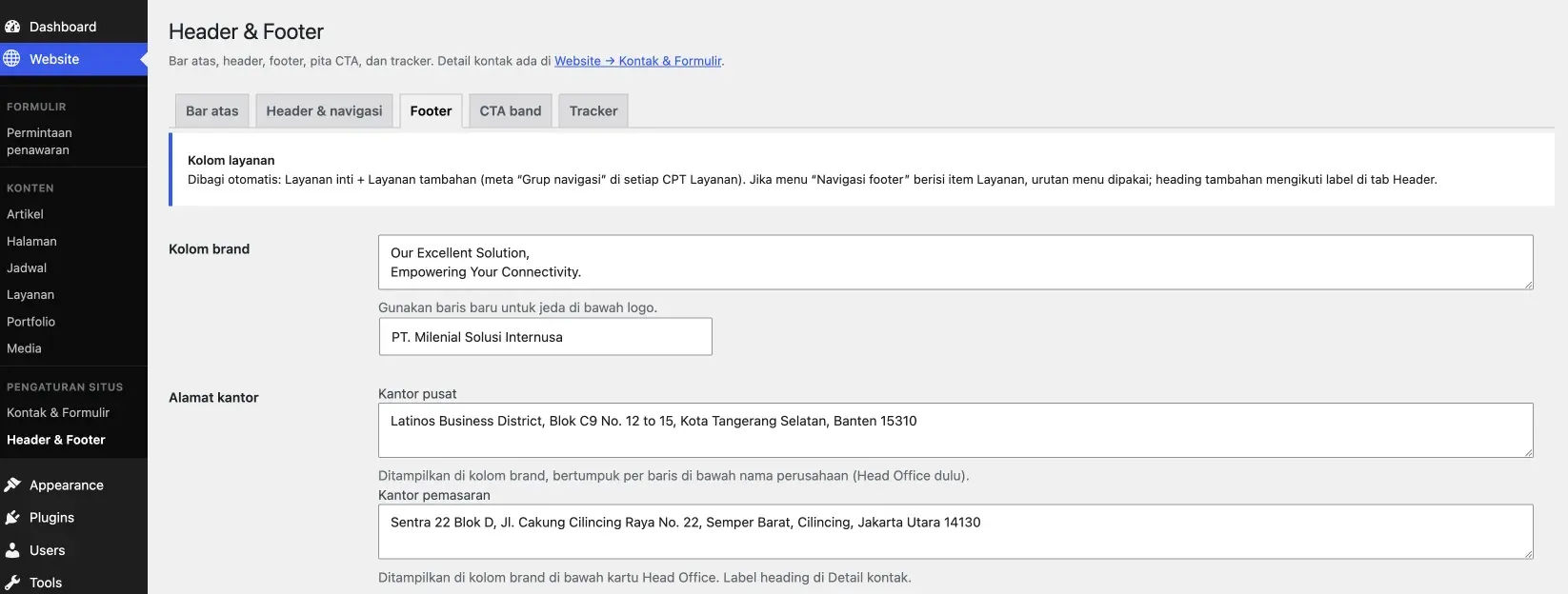
Global settings cover the brand, office addresses, footer, and other sections used across the website.
The block editor was also used for the client and partner logo area. The MSI team could manage the logo order, replace images, and add alt text from the same editor.
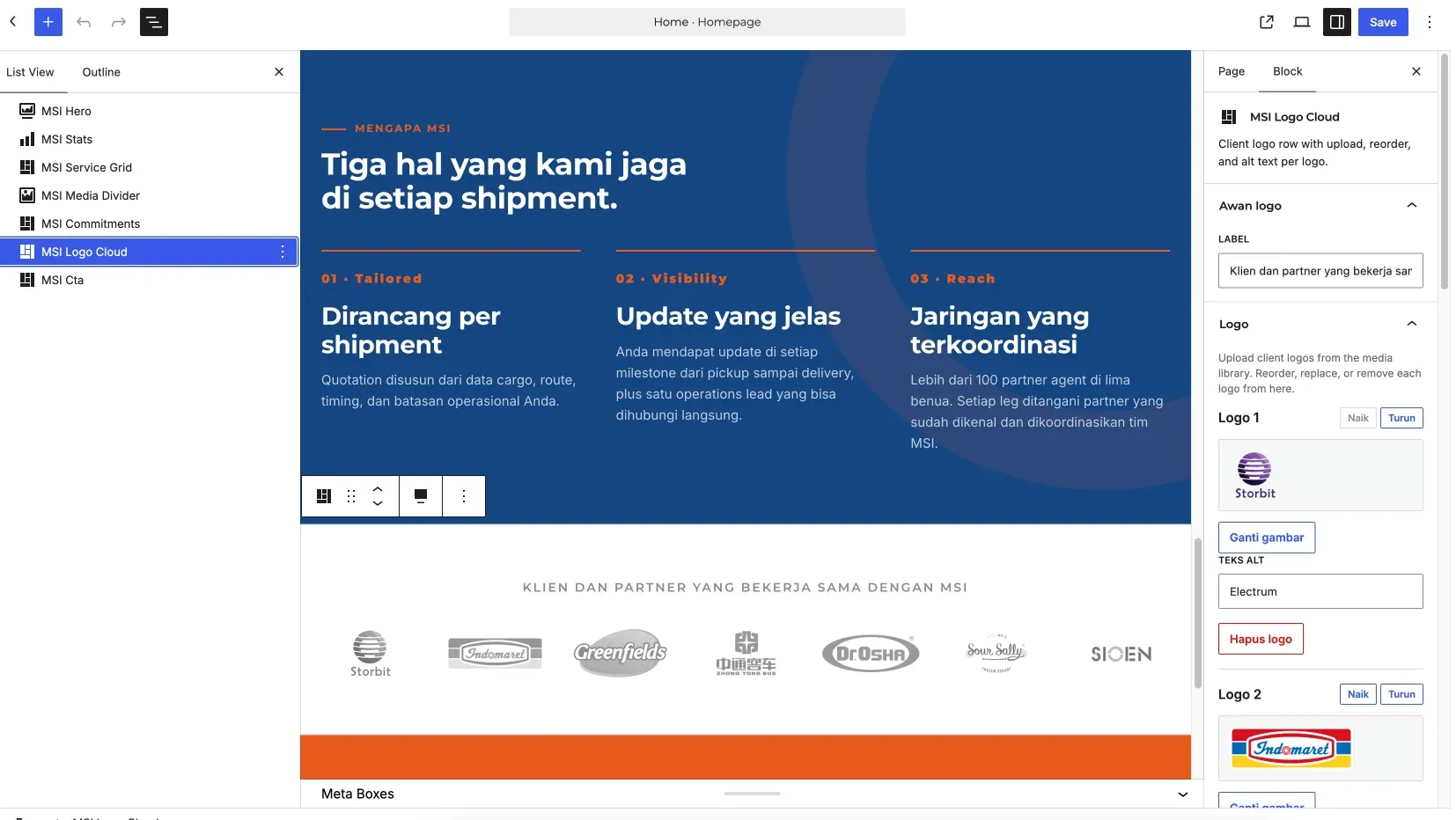
The logo cloud is managed as a block with a more structured image and alt text workflow.
The trade-off was that a custom theme required more development and QA time at the beginning.
In return, MSI received a system that fit their design more closely and did not require a collection of overrides to force a generic theme to follow the HTML site.
Before full development began, I prepared the SEO and content structure for the Indonesian market.
This research was not only about finding the keywords with the largest volume. I needed to make sure the keywords matched MSI’s services, had clear search intent, and could be turned into useful pages.
I used Semrush as the primary data source. The database was set to Indonesia, and the basic keyword-selection appendix was sent to MSI on July 22, 2026.
I used Semrush to find keyword variations and review the available volume data. I still treated volume as a provider estimate, not as a guaranteed absolute number of searches each month.
After getting the initial list, I manually validated it through Google Search and the SERP. I looked at the pages that appeared, the type of content they used, their search intent, and whether Google more often showed service pages or articles for a particular query.
I also compared the patterns used by websites appearing in the SERP with industry references. The goal was not to copy competitors, but to understand what information needed to be answered for topics such as LCL, FCL, air freight, customs clearance, PPJK, and project cargo.
For terms related to import, export, and regulations, I cross-checked the wording against official sources. This helped ensure that the copywriting did not simply follow terminology used by other websites.
I then validated the research against the company profile, brand guidelines, service list, and discussions with the MSI team. This allowed me to confirm that the selected keywords represented services MSI actually offered.
Data from the old website and its analytics reports also provided context. However, I did not use them as the only basis because the old tracking still recorded many local actions, such as Google Maps activity, rather than verifiable web leads.
The keyword research covered the homepage and the 11 services listed in the company profile. After that, I created a keyword map so each intent group had a clear page owner.
For each page, the result was translated into:
This kept keyword research from ending as a spreadsheet. The results became the basis for the sitemap, URL structure, copywriting, and internal linking system used during development.
The decision to use Indonesian as the primary language also came from this process. Relevant transactional keywords often used terms such as “jasa”, “import”, and “freight forwarder”.
The initial research produced 85 keyword variations. Sixty of them had available volume data.
The rest needed to be treated more carefully because they did not have enough volume data to support a demand claim.
I also did not force every keyword previously mentioned by an earlier vendor into the website.
For example, MSI had seen the homepage appear for the term “jasa LCL murah”. However, the research showed that “jasa import LCL” had volume, while the “murah” addition did not have enough data.
So I still prepared an LCL service page, but I did not stuff the word “murah” into the copywriting simply because it had appeared in a ranking claim.
The page structure, title, meta description, and internal linking needed to follow intent and more credible evidence.
In addition to the service pages, I migrated 32 articles from the old website together with their images and SEO metadata.
Those articles remained important because they could become sources of internal links to the new service pages.
One of the main features was the quote request form.
The form used Cloudflare Turnstile to reduce spam, email delivery through Resend SMTP, a confirmation email for the sender, and a notification for the MSI team.
For service and portfolio content, I used a more structured data model instead of writing everything as one long page.
The team could manage each item from the dashboard while the frontend templates continued to maintain visual consistency.
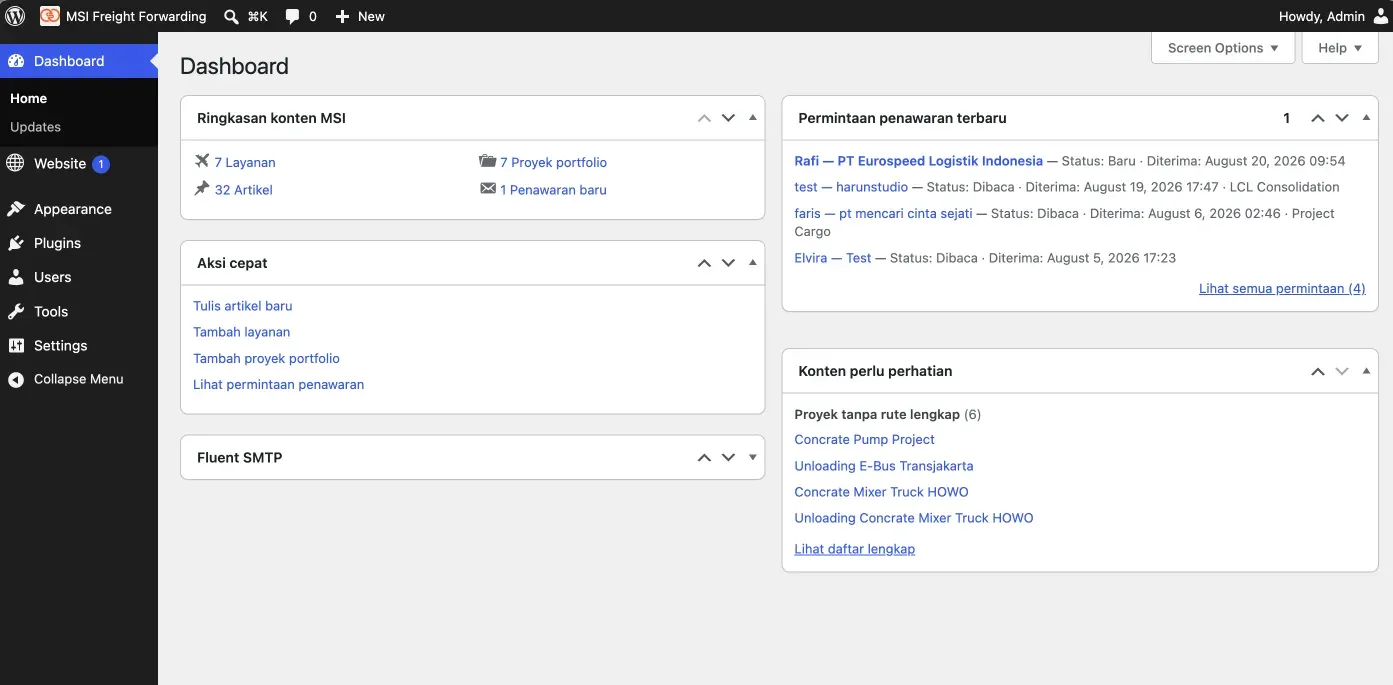
The dashboard brings services, portfolio items, articles, and quote requests together so the team can see its main work from one place.
Export and import schedules were also made editable from the WordPress dashboard.
Information that had previously been prepared in files could be displayed as tables on the website, with a PDF download option for visitors who still needed the official document format.
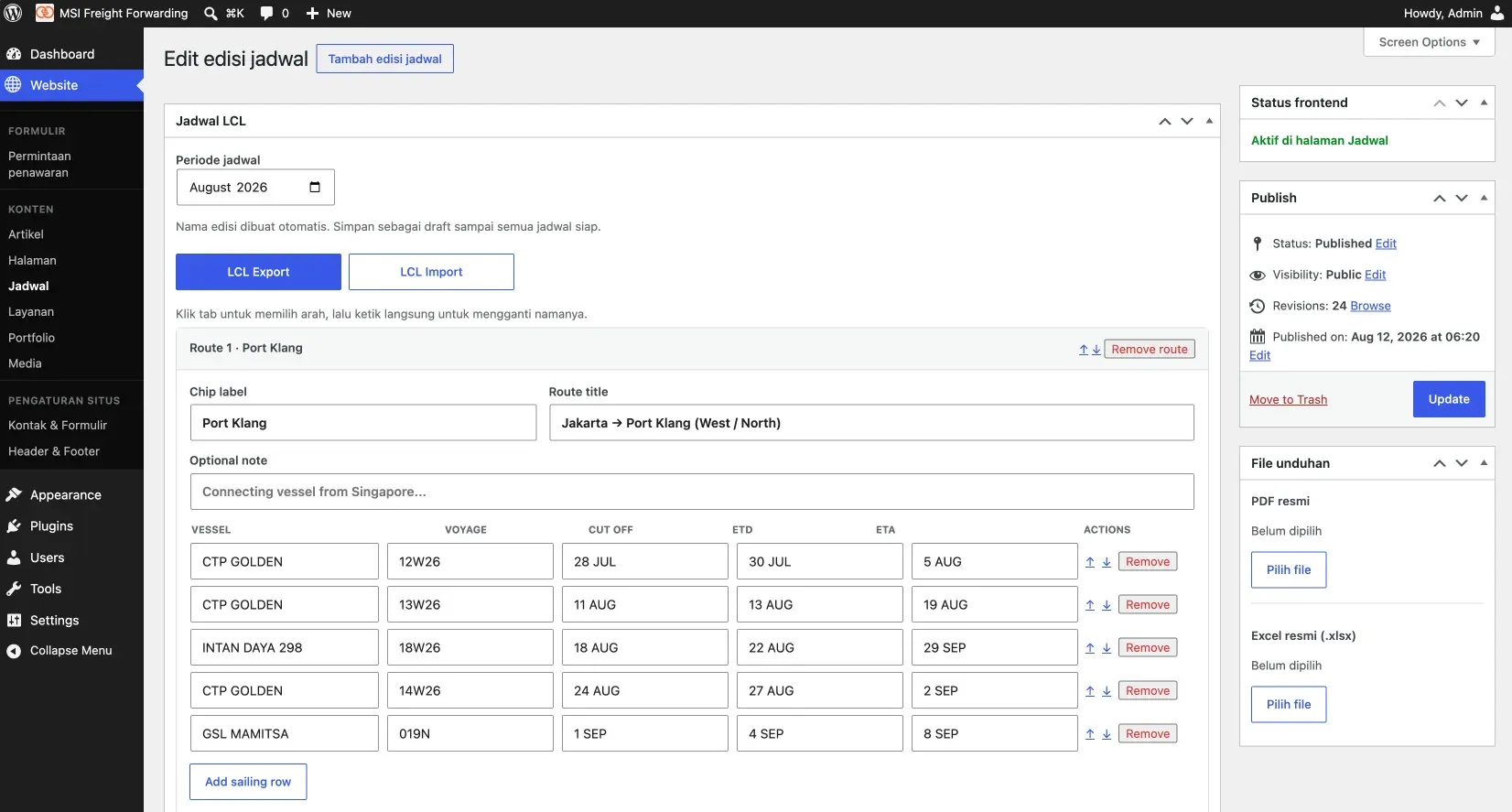
The schedule editor provides export and import tabs, route, vessel, voyage, cut off, ETD, ETA, and downloadable files.
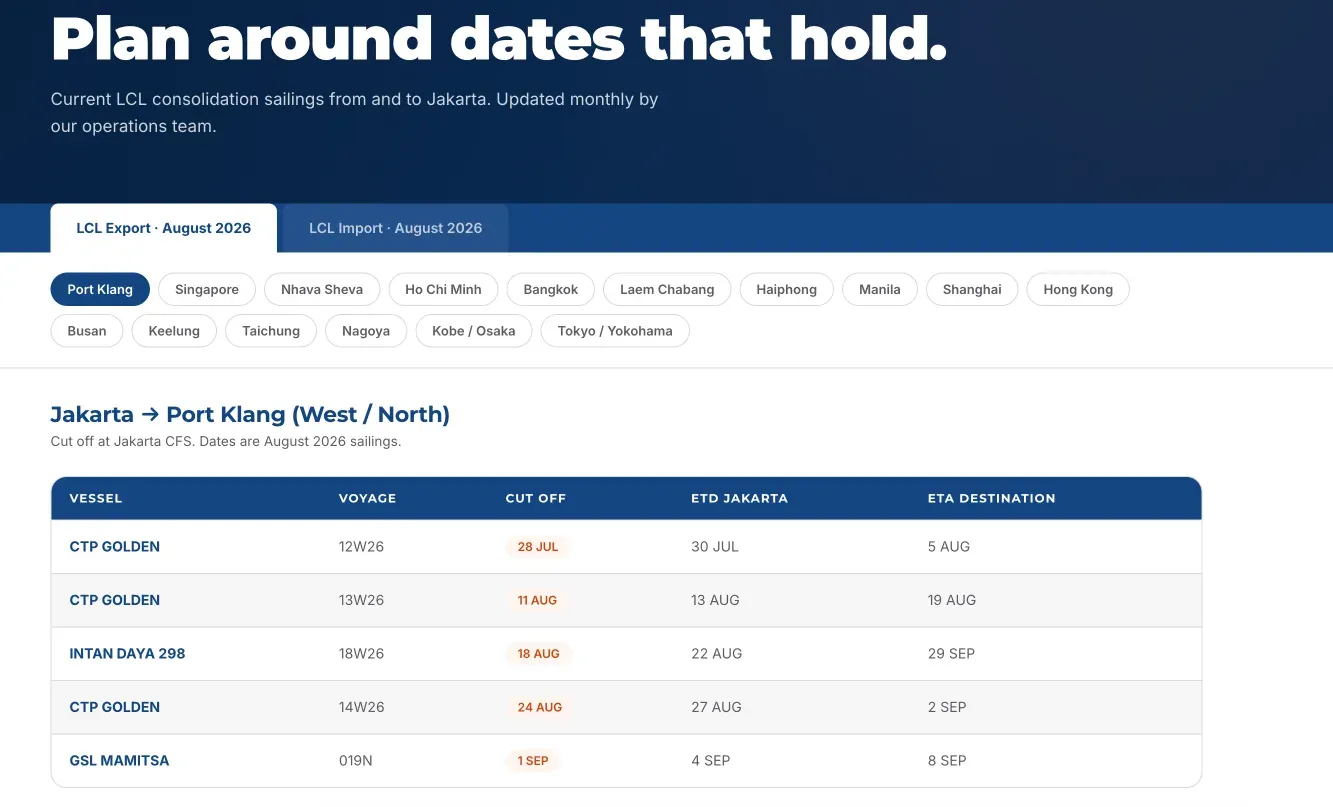
On the frontend, schedule data appears as an easier-to-scan table and can still include the official file.
During one test, the schedule data appeared to disappear after it was saved.
I restored it through WordPress revisions and then fixed an escaping issue in the data sent to the editor.
This is a small example of why revisions and recovery flows need to be treated as part of the system, rather than as optional features that can be ignored.
Shipment tracking was intentionally not included as a production feature in this phase.
MSI had already prepared API documentation and the homepage displayed a “coming soon” area, but the data source was still connected to an ERP transition and internal systems.
Building a tracking plugin before the data source became stable would only create rework.
That is why I positioned the API integration as a later development phase, after MSI’s ERP had become the final source of truth.
Website migration is not finished when the new homepage is visible.
Old URLs, articles, sitemaps, analytics, email, and DNS configuration also need to be checked so the move does not break an existing flow.
To preserve the old URLs, I prepared 346 301 redirect rules in Cloudflare.
Those rules were activated when the website was moved to MSI’s hosting and the launch process was ready.
There was also a classic post-migration issue: the /artikel/ URL returned a 404. The cause was not a missing page, but WordPress permalink rules that needed to be refreshed.
I resolved it by flushing or saving the WordPress permalinks again.
The article route then worked normally. It looks simple, but it still belongs in the QA checklist because this issue often appears after a hosting move or URL structure change.
The mobile navigation was tested as well because the service menu had several category levels. On smaller screens, the menu still gave access to services, articles, contact, and the primary CTA without changing the desktop information structure.
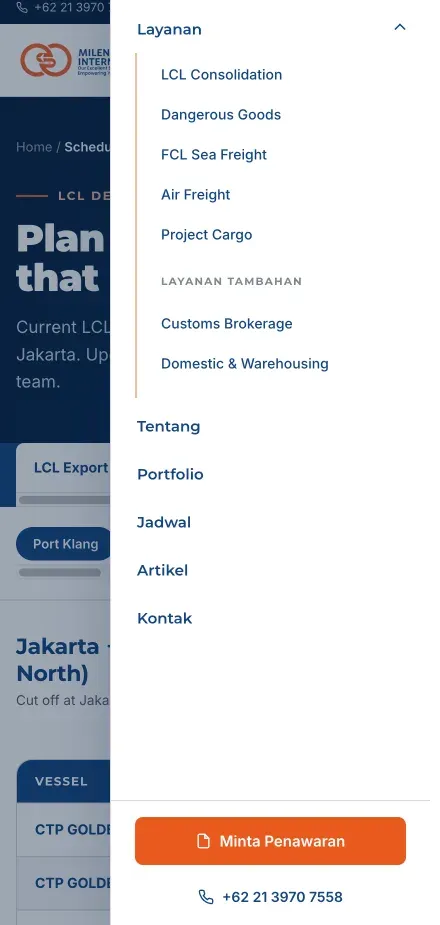
The mobile menu preserves the service hierarchy and primary CTA in a smaller screen space.
The project changes can be seen from several angles:
| Area | Before | After |
|---|---|---|
| Visual source | HTML site as the frontend | Custom theme following the HTML design |
| Page management | Depended on the frontend implementation | WordPress with custom blocks |
| Main page scope | Old website with limited structure | 13 pages based on the HTML site |
| Article content | Stored in the old system | 32 articles migrated with images and metadata |
| Old URLs | Needed to be remapped | 346 active 301 rules in Cloudflare |
| Export-import schedule | Files and a manual process | Managed from the dashboard and displayed on the website |
The PageSpeed Insights snapshot I saved recorded desktop performance at 100 and mobile performance at 92.
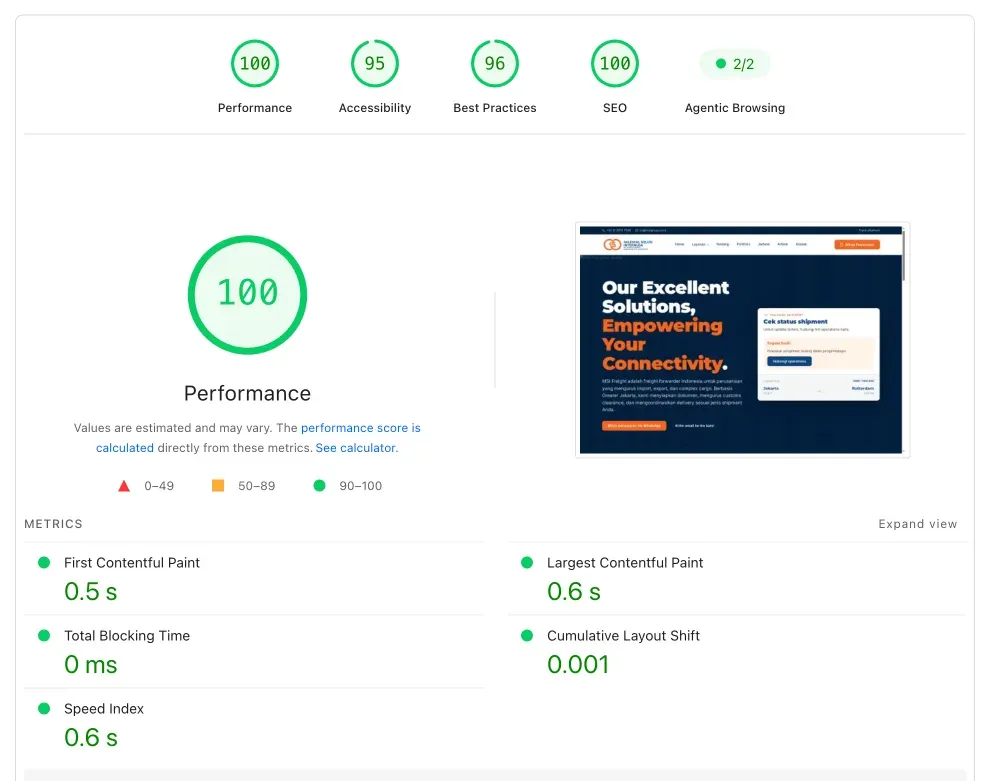
Desktop snapshot: performance 100, FCP 0.5 seconds, LCP 0.6 seconds, TBT 0 ms, and CLS 0.001.
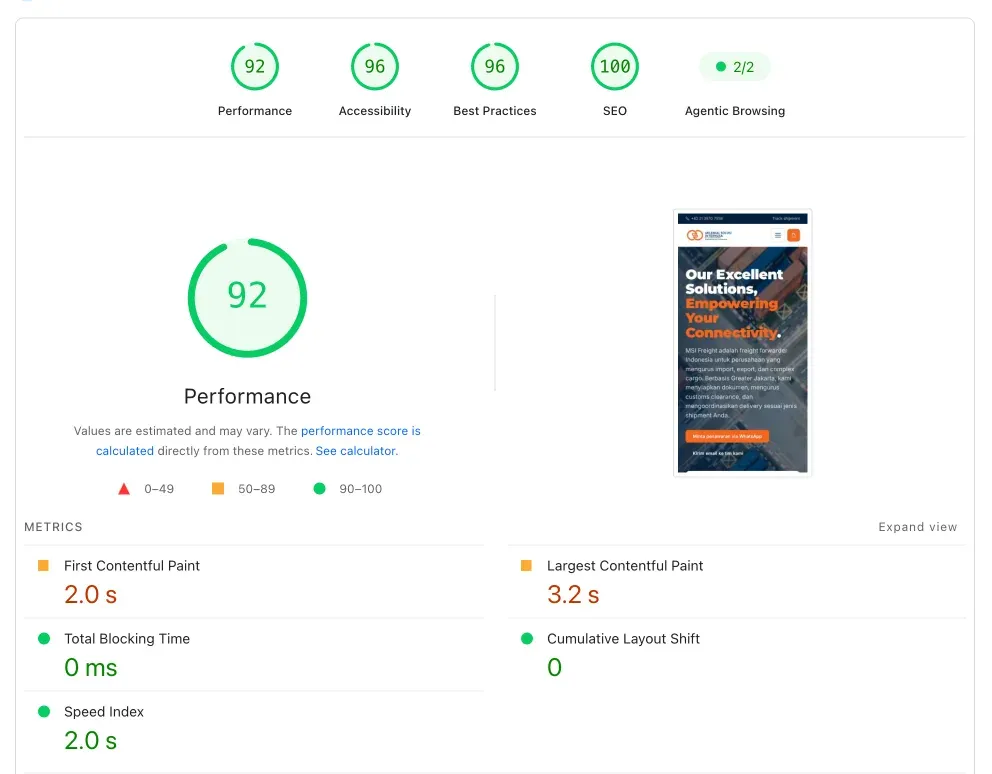
Mobile snapshot: performance 92, FCP 2.0 seconds, LCP 3.2 seconds, TBT 0 ms, and CLS 0.
Why was the mobile score lower? The homepage hero used video, so downloading, decoding, and rendering it was more noticeable on mobile devices.
Google Tag Manager and Meta Pixel also added work from third-party scripts. Within this project scope, I considered a score of 92 reasonable without removing elements MSI genuinely needed.
However, PageSpeed Insights is a lab test using a simulated device and network. A score of 92 does not automatically mean that the real experience is worse than a page with a score of 100.
With different devices, networks, caches, and scripts, a page with a lab score of 92 can feel faster in practice. That is why the number should be read together with real-user data when traffic and field data become available.
Tracking readiness also needs to be separated from business results.
GA4, GSC, GTM, Meta Pixel, WhatsApp events, phone events, and form events help MSI collect more useful data, but they do not automatically prove an increase in leads or revenue.
The initial plan using GeneratePress and GenerateBlocks was based on the information available during the proposal stage.
After the HTML site was shown in the meeting, the most reasonable decision changed to a custom theme and custom blocks.
For me, this was not a scope change to avoid. It was the result of discovery making the implementation better fit the client’s assets and expectations.
If the design does not exist yet or is still very flexible, a mature theme and block system can be an efficient choice.
Custom architecture makes sense when the design is already specific, the editing workflow needs to be controlled, and the visual result must stay consistent.
Redirects, permalinks, revisions, and the QA checklist may not be visible on the homepage.
Yet those details often determine whether the new website can be used without losing access to old content.
I did not force shipment tracking into production simply because its UI area already existed.
Waiting for the ERP and API to become more stable was safer than shipping a feature that would need to be rebuilt when its data source changed.
The exportimportdept.com project shows that transforming HTML into WordPress does not have to sacrifice a client’s existing design.
The main challenge was translating a fixed visual implementation into a content system that remained flexible.
With a custom theme and custom blocks, MSI received 13 HTML-based pages that could be managed through WordPress.
Behind that was an SEO foundation, article migration, redirects, forms, schedules, and tracking prepared for the next stage of marketing and operations.
If you already have an HTML site with a design you want to preserve, I can help map which parts can be converted into blocks.
Functionality that is safer as custom code can be separated from the beginning.
You can start with our website development service or contact us to discuss a WordPress blocks conversion.

Founder of Harun Studio, web developer, blogger, and hosting reviewer. He helps business owners build healthier websites through design, development, and long-term maintenance.
Explore more insights that connect closely with this topic.
 CASE STUDIES
 A case study on the migration of Penasihat Hosting: from a WordPress setup that was actually still solid to Next.js 16 + PostgreSQL for long-term flexibility, a custom CMS, tool pages, and a more scalable product foundation.
Read Article CASE STUDIES
 From a 404 error on firesystem.co.id to a full rebuild as hydrantsystem.co.id: a case study on building a lightweight, fast, and easy-to-manage website with a modern WordPress stack.
Read Article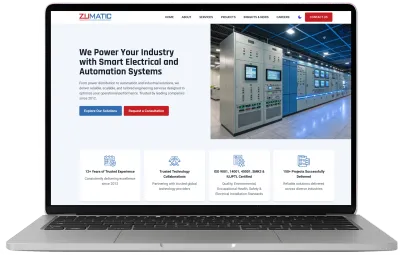 CASE STUDIES
 A case study on PT Zumatic: mobile performance improved from 53 to 93 and desktop from 81 to 100 through technical auditing, WordPress performance optimization, and a much simpler content workflow.
Read Article